> For the complete documentation index, see [llms.txt](https://etherdrops.gitbook.io/etherdrops-bot/llms.txt). Markdown versions of documentation pages are available by appending `.md` to page URLs; this page is available as [Markdown](https://etherdrops.gitbook.io/etherdrops-bot/core-features/subscriptions.md). Agents can also search and read this documentation through its [MCP server](https://etherdrops.gitbook.io/etherdrops-bot/~gitbook/mcp).
# Subscriptions
Drops Bot offers several subscription plans to expand your tracking limits and unlock advanced features. You can subscribe via the **website** or using **Telegram Stars** inside the bot.
***
### 💳 **How to Subscribe via Website**
> Suitable for any bot except **@drops** (use one of the active bots listed below)
{% stepper %}
{% step %}
Activate any bot from the list:
Active Drops Bot accounts
**Standard Bots**
* [@EtherDrops\_bot](https://t.me/EtherDrops_bot)
* [@EtherDrops1\_bot](https://t.me/EtherDrops1_bot)
* [@EtherDrops2\_bot](https://t.me/EtherDrops2_bot)
* [@EtherDrops3\_bot](https://t.me/EtherDrops3_bot)
* [@EtherDrops4\_bot](https://t.me/EtherDrops4_bot)
* [@EtherDrops5\_bot](https://t.me/EtherDrops5_bot)
* [@EtherDrops6\_bot](https://t.me/EtherDrops6_bot)
* [@EtherDrops8\_bot](https://t.me/EtherDrops8_bot)
* [@EtherDrops9\_bot](https://t.me/EtherDrops9_bot)
**Premium Bots**
* [@EtherDrops\_Premiumbot](https://t.me/EtherDrops_Premiumbot)
* [@Drops\_Premiumbot](https://t.me/Drops_Premiumbot)
* [@Drops\_Premium1bot](https://t.me/Drops_Premium1bot)
* [@Drops\_Premium2bot](https://t.me/Drops_Premium2bot)
* [@Drops\_Premium3bot](https://t.me/Drops_Premium3bot)
{% endstep %}
{% step %}
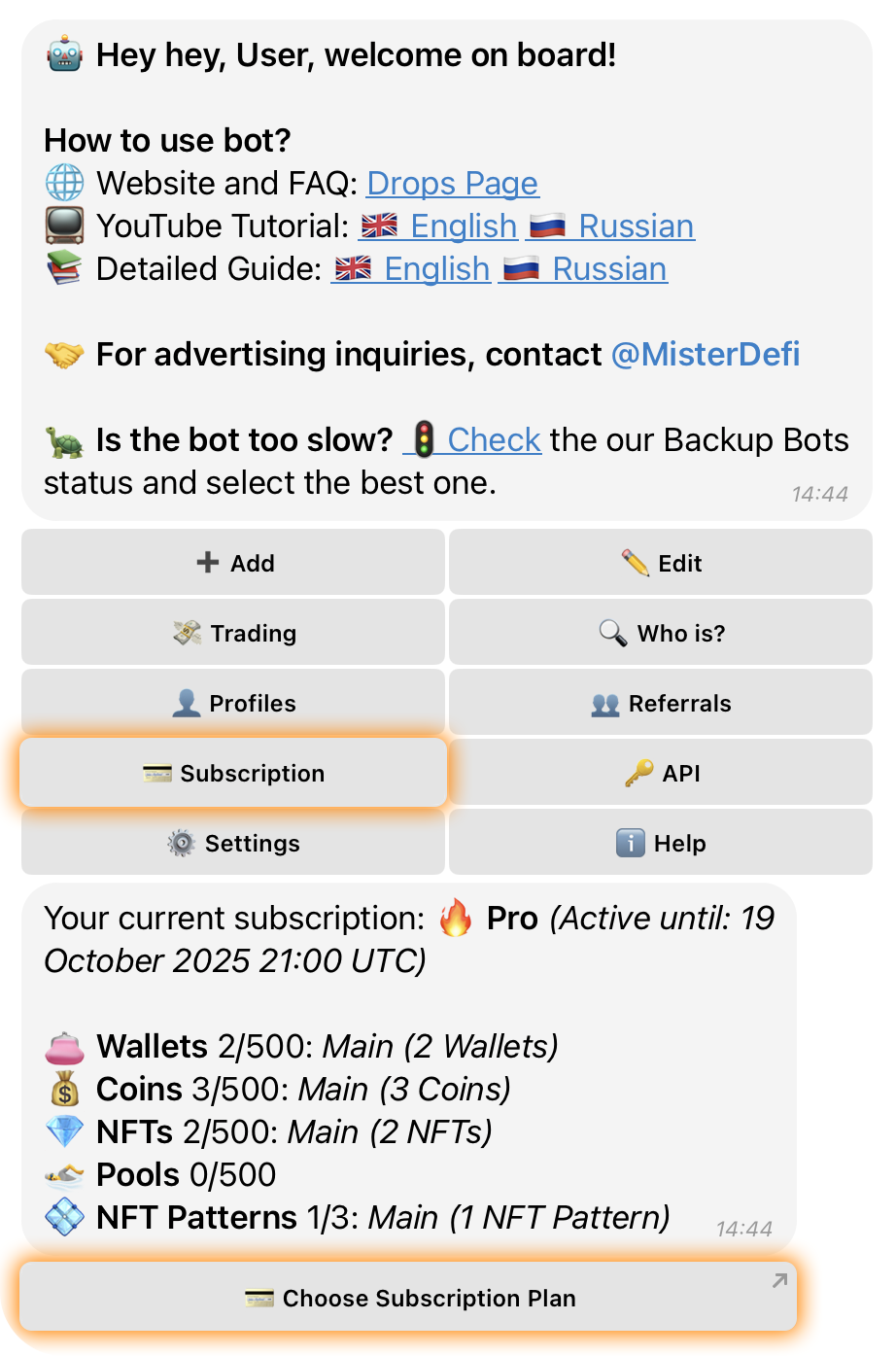
Tap **“💳 Subscription”** in the main menu
{% endstep %}
{% step %}
You'll see your current plan and tracking limits:
* 🟦 Polymarket Events
* 👛 Wallets
* 💰 Coins
* 💎 NFTs
{% endstep %}
{% step %}
Tap **“💳 Choose Subscription Plan”**
{% endstep %}
{% step %}
You’ll be redirected to the payment page in your browser
{% endstep %}
{% step %}
Select a **plan**, then tap **“Select Plan”**
{% endstep %}
{% step %}
Choose your **currency and blockchain network**
#### 🔸 Available payment options:
{% hint style="success" %}
Your subscription will be automatically activated on your account.
{% endhint %}
***
### ⭐️ **How to Subscribe with Telegram Stars**
> Available only in the **@drops** bot.
{% stepper %}
{% step %}
Activate the **@drops** bot
{% endstep %}
{% step %}
Tap **“💳 Subscription”** in the main menu
{% endstep %}
{% step %}
View your current plan and limits
{% endstep %}
{% step %}
Tap **“💳 Choose Subscription Plan”**
{% endstep %}
{% step %}
Choose your desired plan and billing cycle:
* **Monthly** – billed every month
* **Annual** – billed once per year
{% endstep %}
{% step %}
Confirm the selected plan
{% endstep %}
{% step %}
The bot will display the price in **Telegram Stars** and a support contact
{% endstep %}
{% step %}
Tap **“Pay ⭐️”** and complete the payment via Telegram Stars
{% endstep %}
{% endstepper %}
{% hint style="success" %}
Your subscription is now active for the selected duration.
{% endhint %}
***
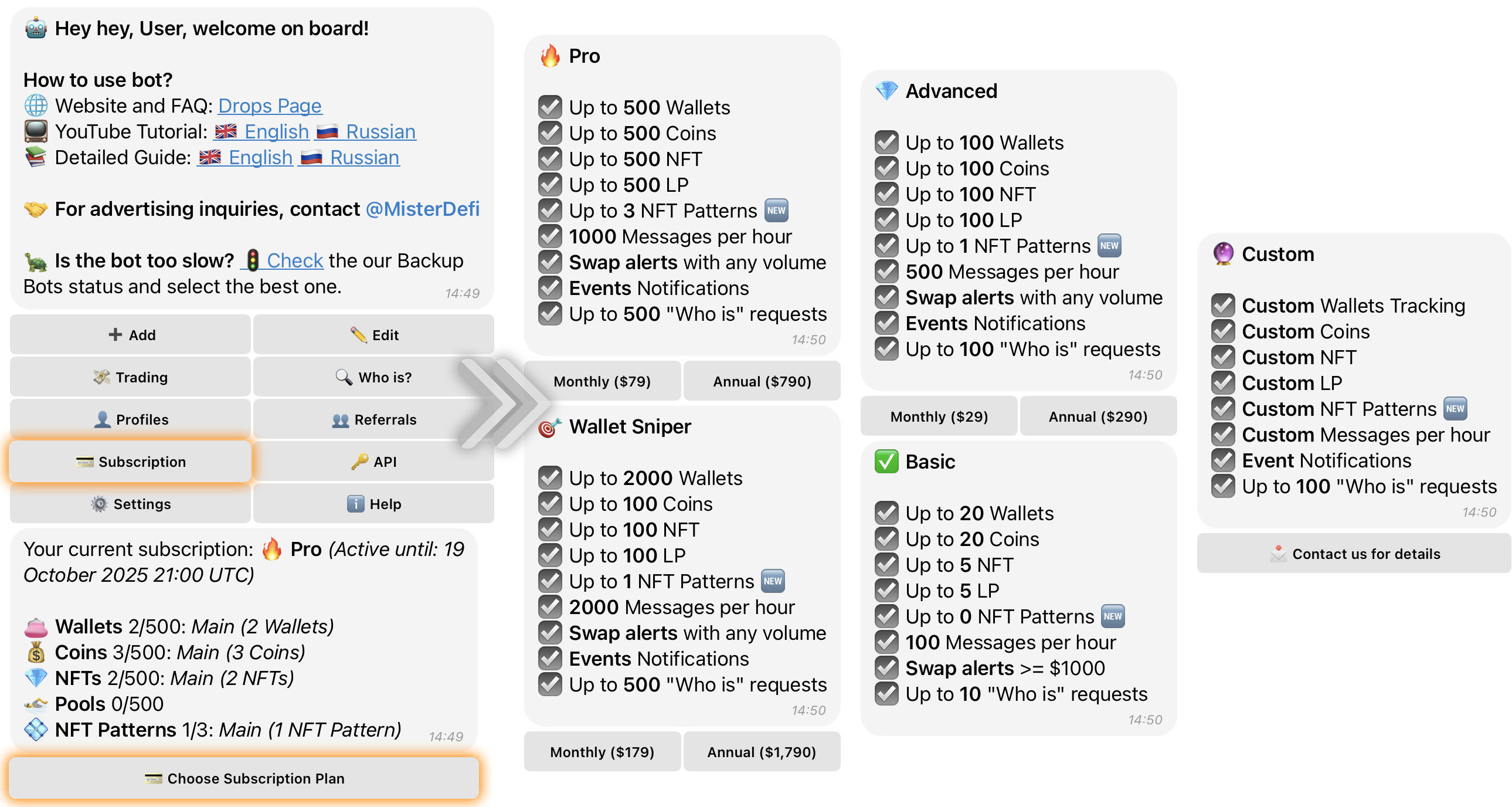
### 📦 **Subscription Plans Overview**
{% tabs %}
{% tab title="✅ Basic (Free by default)" %}
* 20 Wallets
* 20 Polymarket Events
* 20 Coins
* 20 NFTs
* 100 messages/hour
* Swap alerts ≥ $1000
{% endtab %}
{% tab title="💎 Advanced" %}
* 100 Wallets
* 100 Polymarket Events
* 100 Coins
* 100 NFTs
* 500 messages/hour
* Swap alerts (any volume)
{% endtab %}
{% tab title="🔥 Pro" %}
* 500 Wallets
* 500 Polymarket Events
* 500 Coins
* 500 NFTs
* 1000 messages/hour
* Swap alerts (any volume)
{% endtab %}
{% tab title="🎯 Wallet Sniper" %}
* 2000 Wallets
* 500 Polymarket Events
* 500 Coins
* 500 NFTs
* 2000 messages/hour
* Swap alerts (any volume)
{% endtab %}
{% tab title="🔮 Custom (On request)" %}
The **Custom plan** is a fully personalized subscription tailored specifically to your needs.\
You can configure **any parameters** available in the bot, including:
* Number of **wallets**
* Number of **Polymarket Events**
* Number of **coins**
* Number of **NFT collections**
* Custom **message limits per hour**
* Full access to **event alerts**
> 🛠️ Everything in the Custom plan is adjustable — you decide the scale and features based on your workflow, monitoring needs, or infrastructure.\
> If you need a setup beyond standard limits, this is the plan built entirely **for you.**
📩 **Need help configuring or purchasing a Custom plan?**\
Reach out to [**@MisterDeFi**](https://t.me/MisterDeFi) or [**@edrops\_support**](https://t.me/edrops_support) — we’ll assist you personally with setup and activation.
{% endtab %}
{% endtabs %}
### 🚫 **Subscription Limit Reached**
When you reach your plan limits (e.g., wallets, polymarket events, coins, nfts), the bot will notify you and suggest:
* **Editing your list** via the **“Edit”** button
* Or **upgrading your plan** via **“💳 Upgrade Subscription Plan”**
If you hit your **notification limit per hour**, the bot will also send a warning. Your hourly message cap depends on your active plan.